Ein Zeitraum, beide Konten
Jede Zahl auf der Vergleichstafel deckt dasselbe Zeitfenster ab, du vergleichst also Gleiches mit Gleichem. Ändere den Zeitraum, und beide Seiten bewegen sich gemeinsam.
Stell dein Konto neben jedes andere. Sieh, wer bei Followern, Likes, Reposts, Antworten, Blocks und Engagement-Score im selben Zeitraum vorn liegt. Keine Tabellenkalkulation, kein Schielen zwischen zwei Tabs.
Jetzt vergleichen
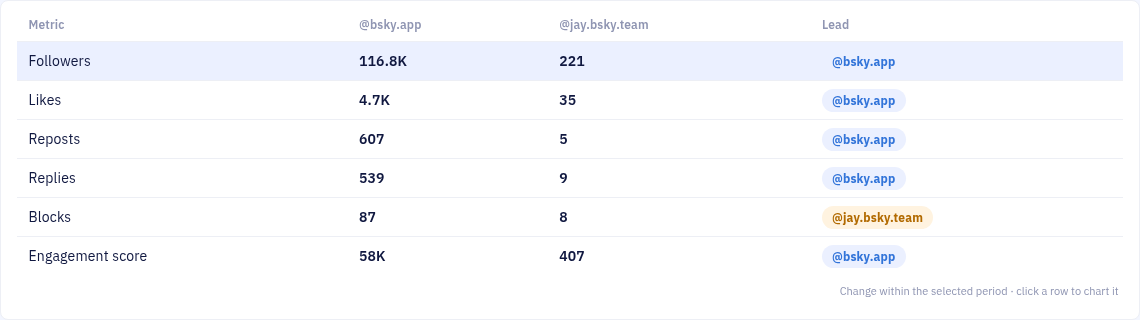
Jede Zahl auf der Vergleichstafel deckt dasselbe Zeitfenster ab, du vergleichst also Gleiches mit Gleichem. Ändere den Zeitraum, und beide Seiten bewegen sich gemeinsam.
Der Engagement-Score gewichtet Likes, Reposts und Antworten und zieht Blocks ab. Ein Konto, das mehr provoziert als verbindet, gewinnt nicht allein über Volumen.
Die Summen sagen dir, wer gewonnen hat. Klick auf eine Zeile, und beide Konten werden über den Zeitraum gezeichnet — das sagt dir, wann. Ein einzelner viraler Post liest sich anders als stetiges Wachstum.
Yes. GraphTracks puts any two Bluesky accounts side by side on followers, likes, reposts, replies, blocks and engagement score for the same period, and shows which account leads on each one.
Followers, likes, reposts, replies, blocks and the weighted engagement score. Blocks count against an account. The comparison rewards the engagement you actually want, not raw volume.
No. You can compare your account against any public Bluesky account. You need a GraphTracks account with your own Bluesky account connected. Compare is part of the Pro plan, and the free trial includes it.
Yes. Click any row in the scorecard and GraphTracks charts both accounts together over the selected period, so you can see where one pulled ahead, not just the final totals.
