
Bluesky Scheduler Posts that land exactly as you wrote them
Write a post or a thread, preview it in Bluesky's own layout, and schedule it for your best hours. GraphTracks stops broken posts before they go out and checks each one after it publishes. Part of GraphTracks Pro.
- Bluesky sign-in, never a password
- Threads up to 25 posts
- Images, video and alt text
- Up to 5 accounts
-
See exactly how it will look
The preview uses Bluesky's own embed code, the same renderer Bluesky uses to show posts on other websites. Links, mentions, hashtags, images, video and link cards appear the way your followers will see them. The 300-character limit is counted the way Bluesky counts it, so an emoji is one character.
-
Broken posts don't get through
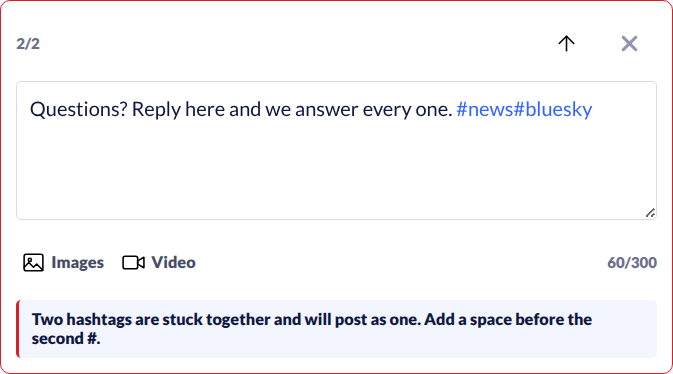
Some mistakes only show up after a post is live. Publish checks every post and every alt text before it can be scheduled or approved, and marks the problem on the exact post in the thread. These are blocked:
- invisible characters pasted from other apps
- hashtags glued together, such as
#news#bluesky - Markdown links, which show up as raw brackets on Bluesky
- images without alt text
- alt text that repeats the post, or contains a link
-
Checked after it publishes
Some schedulers lose alt text or mangle hashtags on the way to Bluesky. After publishing, GraphTracks reads your post back from Bluesky and compares the text, links, hashtags, attachments, alt text and language with what was approved. If anything differs, the post is flagged and you get an email listing what changed.
-
Your best hours, from your own data
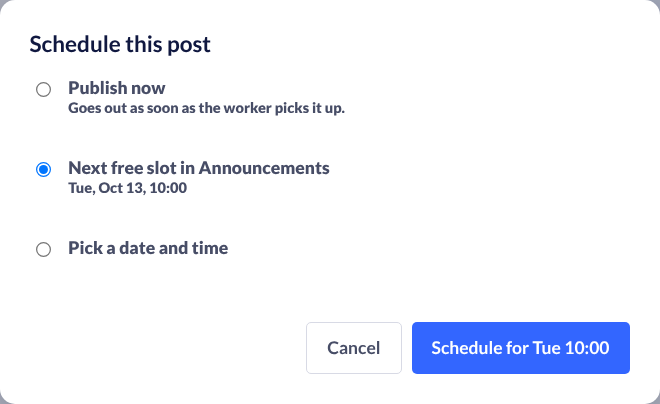
GraphTracks already tracks when your posts get likes, reposts and replies. Publish uses that to fill your posting slots, so your queue matches your audience, not a generic "best time to post" chart. Each queue has its own timezone.
-
Writers write, owners approve
Invite a writer or a social media manager as an editor. They draft and submit; you approve, request changes or reject. They work under your Pro plan, so they don't need one of their own. Roles: owner, editor, approver, viewer. If you post alone, you're your own approver and nothing waits in a queue.
-
Everything a Bluesky post can hold
- threads up to 25 posts, each with its own media
- up to 4 images per post, each with alt text
- video with alt text
- link cards fetched for you
- post language set per post
- queues with recurring weekly slots, and a calendar of everything scheduled
-
Never posted hours late by surprise
If Bluesky or our publishing service is briefly unavailable, the post waits and retries. If it still can't go out within 6 hours of its time, we don't publish it late: it's marked missed, you get an email, and you pick a new time. A failed post always comes with an email and the reason.
-
No passwords. Not even an app password.
You connect through Bluesky's own sign-in and approve access on Bluesky's screen; we never see your password. We ask for what publishing needs: posts, reposts and the media you attach. Your connection is kept encrypted in a separate service in the EU, away from the rest of GraphTracks. Disconnect any time.
How we keep your account safe →
What Publish doesn't do (yet)
- Bluesky only. No cross-posting to X, Threads or LinkedIn.
- No AI writing. Your words go out as you wrote them.
- No automatic reposts yet, and no follow or unfollow automation.
- No more than 4 images in one post.
- Up to 5 accounts.
Frequently asked questions — Bluesky scheduling
Can you schedule posts on Bluesky?
Not in the Bluesky app itself. GraphTracks Publish schedules single posts, threads, images and video to Bluesky and publishes them at the time you pick.
Do I need to give GraphTracks my Bluesky password or an app password?
No. You connect through Bluesky’s own sign-in and approve access on Bluesky’s screen. We never see your password, and we never ask for an app password.
What can GraphTracks do with my account?
Create and delete posts and reposts, and upload the images and videos you attach. We don’t ask for your messages, follows, likes or blocks. If a future feature needs more, Bluesky asks you to approve it first. If your server doesn’t support these narrow permissions, its sign-in screen shows you the broader access it grants before you approve. Our security page has the details.
What happens if a post fails?
Short outages are retried automatically. If a post can’t go out within 6 hours of its time, it isn’t published late: it’s marked missed and you get an email. Failures come with an email and the reason.
How do I know my post went out correctly?
After each post publishes, GraphTracks reads it back from Bluesky and compares it with what was approved. If the text, links, hashtags, media or alt text differ, you see a warning on the post and get an email.
Can my social media manager post without my password or a plan of their own?
Yes. Invite them as an editor. They write and submit, you approve, and they work under your Pro plan. They need a free GraphTracks account to be invited.
How many accounts can I schedule for?
Up to 5, counted together with the accounts you track in analytics. An account that is both counts once.
Does it pick the best time to post?
It fills your posting slots from your own account’s engagement history in GraphTracks, in your queue’s timezone. You can change any slot.
How do I disconnect?
Any time, in Publish settings. We delete the stored access and ask Bluesky to revoke it, and scheduled posts for that account stop. You can also revoke access yourself on Bluesky’s account page.
Is Publish free?
It’s part of GraphTracks Pro, and the 7-day Pro trial includes it.
Included in Pro
Publish is part of GraphTracks Pro, next to the full analytics, Account Health and Compare. Try it free for 7 days.
